Collapsed mobile navigation
Hamburger Menu
A compact menu button that opens the main navigation on smaller screens or dense interfaces.

Website Anatomy
Hover or focus the numbered markers on the diagram to see what each website element is and how it supports the user's next step.
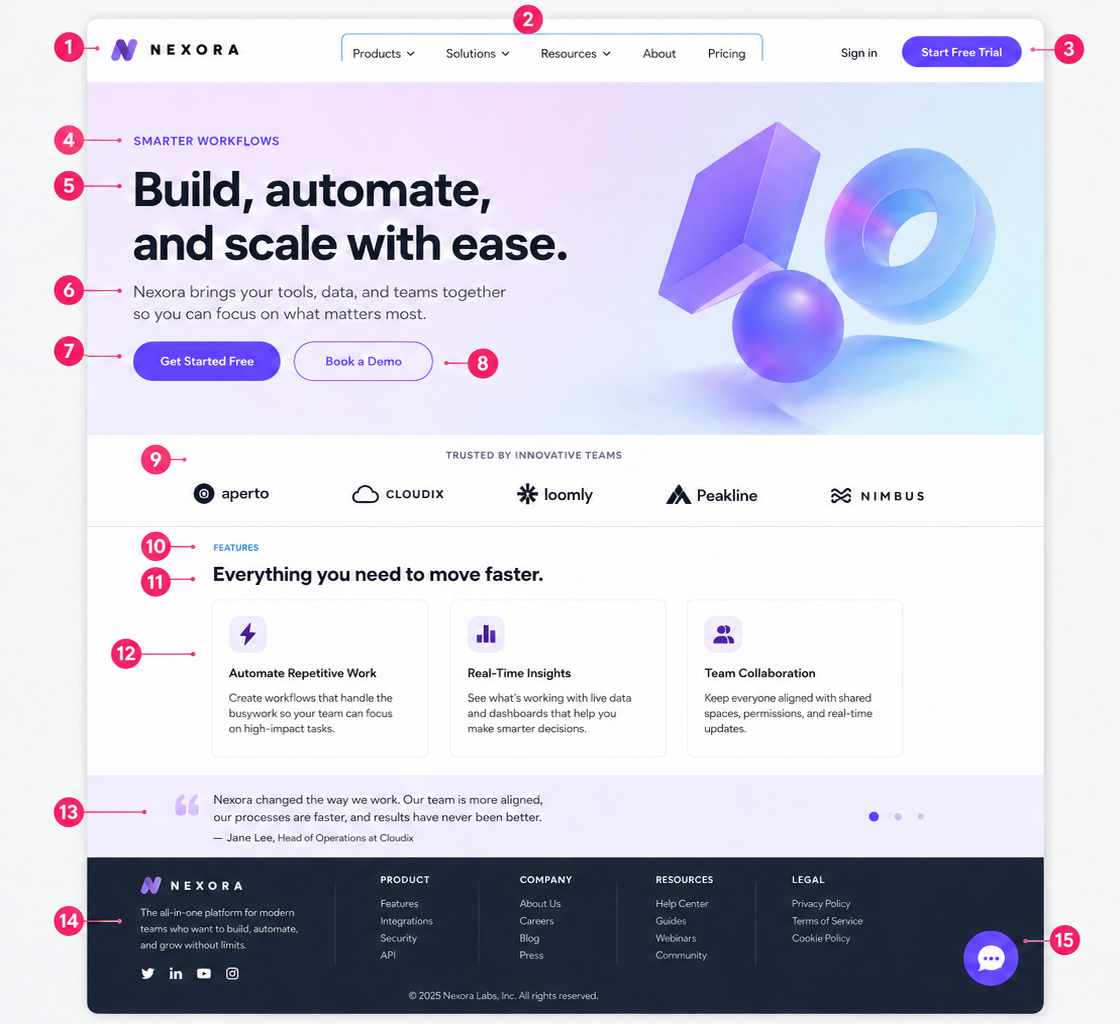
Additional reference
These elements are common on modern websites, but they are not part of the numbered guide image above.
Collapsed mobile navigation
A compact menu button that opens the main navigation on smaller screens or dense interfaces.
Findability tool
A site search field helps users jump directly to products, articles, services, or support content.
Page trail
Breadcrumb links show where a page sits in the site structure and help users move back up a level.
Lead capture
A form collects the details needed to respond, qualify a lead, book a call, or route a support request.
Expandable answers
An accordion keeps common questions scannable while letting users open the answers they need.
Priority notice
A slim banner can highlight urgent updates, promotions, event information, or service changes.
Consent notice
A consent banner lets users manage tracking preferences when analytics or marketing cookies are used.
External channels
Social links point visitors to active public channels without distracting from the site's primary action.
Open chat
Enter your domain and/or describe the part you are looking at. The SWATS chat will open with your note to identify it.
Fictional example
This guide uses a fictional sample page and fictional brand name for educational purposes. It was generated from scratch and is not affiliated with, endorsed by, or intended to represent any real company, product, or trademark that may use the same or a similar name.